Introduction
With hybrid work and mergers and acquisitions (M&A) continuing to shape modern businesses, secure and reliable remote access has become an important challenge for IT teams.
Traditionally, many organisations have relied on on-premises Active Directory, Windows file servers, mapped network drives, and Virtual Private Networks (VPNs). This setup can work well inside an office network, but it can become more complicated when employees work remotely, external vendors need access, or two organisations need to integrate their IT environments.
As an IT Systems Manager, I have seen these challenges in practice. Managing VPN access for external parties, supporting users who need to access files from remote locations, and helping users adapt to SharePoint Online all require more than simply changing technology.
In this article, I will explore the limitations of traditional VPN-based file access, the challenges of moving from mapped drives to SharePoint Online, and where Microsoft Entra Private Access may fit into a longer-term cloud migration strategy.
The goal is not to suggest that every business should immediately retire its VPN. Instead, it is to explain how IT teams can evaluate these options and move towards a more secure, manageable remote-access environment.
1. The Challenges of Traditional On-Premises File Servers
Many businesses still rely on Windows Server file shares, including servers running Windows Server 2022. Users access shared folders through mapped network drives, such as D:, E:, or M:, using familiar tools like Windows File Explorer.
This approach has served businesses well for years. However, it can create several challenges as organisations become more distributed.
M&A and external access management
When a business works with external vendors or integrates with another organisation, providing access to internal file shares can require several IT tasks.
Depending on the existing environment, administrators may need to create or manage Active Directory accounts, configure permissions, provision WatchGuard VPN access, and troubleshoot connectivity issues.
For IT teams, this creates additional administrative work. It also raises security questions: does an external user need access to an entire network, or only to a specific application or file resource?
The principle of least privilege suggests that users should receive only the access they need to perform their work.
During an acquisition, these challenges can become more significant because the two organisations may have different domains, security policies, network configurations, and user-management processes.
Remote access and file performance
In my experience, accessing large files on an on-premises file server from a remote location can be frustrating, particularly when the connection has high latency or limited bandwidth.
Traditional VPN connections can provide secure access to internal resources, but they do not eliminate the performance limitations of the underlying network.
File operations using Server Message Block (SMB) can be especially sensitive to latency because some operations involve repeated communication between the client and server. The experience can therefore differ significantly from accessing files on a local office network.
The exact performance depends on the VPN configuration, network quality, file workload, and server environment. SSL VPN and IKEv2 are examples of VPN technologies, but neither protocol alone determines whether a connection will be fast or slow.
For organisations with remote employees who regularly work with large files, it is worth evaluating whether those files should remain on a traditional file server or move to a cloud collaboration platform.
The overhead of hybrid infrastructure
Hybrid environments can be necessary, especially when a business still depends on legacy applications or on-premises resources.
However, maintaining on-premises Active Directory, domain controllers, directory synchronisation, hybrid device configurations, and local servers adds operational responsibilities.
These components need appropriate monitoring, patching, backup, security controls, and troubleshooting.
Moving suitable workloads to Microsoft 365 and adopting cloud-native identity management can reduce some of this overhead. It does not automatically remove every on-premises dependency, but it can provide a practical direction for gradual modernisation.
2. The Migration Challenge: SharePoint Online vs. Mapped Drives
For businesses that primarily use file servers for document storage and collaboration, SharePoint Online can be a suitable destination for selected workloads.
Microsoft 365 provides cloud-based document storage, collaboration, version history, and external sharing capabilities. Users can access supported content through a browser or synchronise files using the OneDrive sync client.
However, migrating files is only part of the challenge. User adoption can be just as important as the technical migration.
Why users resist leaving mapped drives
Users who have worked with traditional mapped drives for years are often comfortable with their existing workflow.
They know where their folders are, how to access them in File Explorer, and how to save files without opening a browser.
SharePoint Online introduces a different structure. Administrators need to plan sites, document libraries, permissions, and folder organisation. Users may also need to learn how to access shared libraries through SharePoint or OneDrive.
OneDrive shortcuts and synchronisation can make cloud document libraries accessible through File Explorer, but they are not identical to traditional mapped network drives. Synchronisation settings, file availability, permissions, and application compatibility all need consideration.
In my experience, moving users away from the old mapped-drive workflow can be difficult, even when the cloud platform offers better collaboration options.
A technically successful migration does not guarantee that users will embrace the new workflow.
Change management matters
A migration can lose momentum if users find the new environment confusing or believe that the previous method was easier.
This is why I recommend planning user communication and training alongside the technical work.
A practical approach includes:
- Start with a pilot: Select a small group of users and a suitable set of files.
- Review the existing data: Identify obsolete files, duplicated content, and unnecessary folder structures before migration.
- Design permissions carefully: Make sure users retain appropriate access without carrying over unnecessary permissions.
- Train users: Explain how to find files, work with shared libraries, and use OneDrive synchronisation where appropriate.
- Collect feedback: Address usability issues before expanding the migration.
M&A can also create an opportunity to standardise platforms. If an acquiring organisation already uses SharePoint Online as its preferred document platform, the transition may become part of a broader effort to align systems, security, and business processes.
The key is to treat migration as a business change rather than simply a file-copying exercise.
For a broader look at Microsoft 365 security, including practical settings that business should review during cloud adoption, see my guide : [Microsoft 365 Security: 7 Practical Settings Every Business Should Review].
For more guidance, see Microsoft’s SharePoint migration and planning documentation.
3. Where Microsoft Entra Private Access Fits
Moving suitable documents to SharePoint Online can reduce the need for VPN access to those files. However, most businesses have other private resources that cannot be migrated immediately.
These might include legacy applications, internal web applications, remote administration tools, or servers that still need to remain on-premises.
This is where Microsoft Entra Private Access may be worth evaluating.
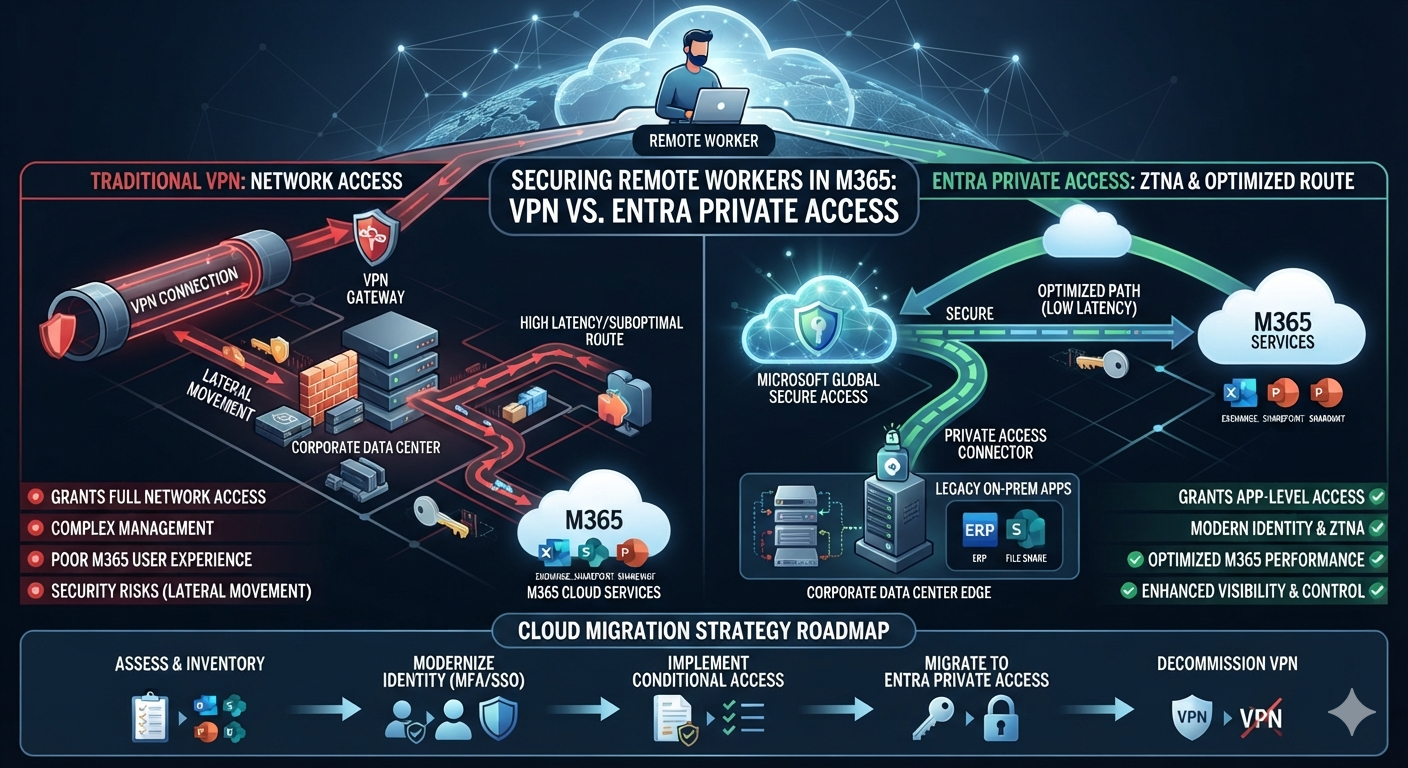
Microsoft Entra Private Access is part of Microsoft’s Global Secure Access offering. It enables organisations to provide identity-based access to specified private applications and resources without necessarily giving remote users broad access to the corporate network through a traditional VPN.
The service uses the Global Secure Access client and private network connectors, alongside configured private resources and access policies.
App-specific access instead of broad network access
With a traditional VPN, the level of access available to a user depends on the VPN design, network routing, firewall rules, and other security controls.
Microsoft Entra Private Access allows administrators to define access to specific private resources and apply policies to those resources.
For example, an organisation might want a particular group of employees to access an internal application while restricting access to other private resources.
This supports a Zero Trust approach: access should be evaluated according to identity, policy, and the resource being requested, rather than assuming that a user should be trusted simply because they have connected to the corporate network.
The benefit is more granular access control. It does not mean that every possible attack or form of lateral movement becomes impossible.
Remote access is only one part of a broader security strategy. In a previous article, I explained how businesses can strengthen their defences against business email compromise (BEC) through multiple layers of protection: [Building a Multi-Layered Defense Against BEC Attacks: Beyond Basic Email Security].
Conditional Access and device security
Microsoft Entra Private Access can work with Microsoft Entra Conditional Access to apply access requirements, such as multifactor authentication (MFA), where supported by the configuration and licensing.
Organisations can also evaluate device-related controls, including Intune compliance, as part of their access strategy when the required capabilities and policies are configured.
These controls can help organisations make access decisions based on more than a username and password.
However, the exact policy design matters. IT teams should verify the relevant licensing, supported scenarios, client requirements, and device conditions before treating these controls as a replacement for an existing security architecture.
Does Entra Private Access replace WatchGuard VPN?
Not necessarily.
Microsoft Entra Private Access may be an alternative for certain private-resource access scenarios, but a business should first identify what its existing VPN is used for.
For example, an organisation might use its VPN for:
- Access to internal applications and servers.
- Access to network resources that have not yet been migrated.
- Administrative access to infrastructure.
- Other network-level requirements that extend beyond a single private application.
Each use case needs to be assessed separately. Some may be suitable for Entra Private Access, while others may require a traditional VPN or another solution.
The objective should be to reduce unnecessary broad network access and simplify remote connectivity where possible—not to replace technology without understanding its current purpose.
For the technical overview, see Microsoft’s official guide: Learn about Microsoft Entra Private Access.
4. Comparing Traditional VPN, SharePoint Online and Entra Private Access
These technologies address different requirements, so they should not be treated as direct substitutes in every scenario.
| Consideration | Traditional VPN | SharePoint Online | Entra Private Access |
|---|---|---|---|
| Primary purpose | Remote network access | Cloud document storage and collaboration | Controlled access to private resources |
| Typical use case | Internal servers and network resources | Shared business documents and team files | Selected internal applications and private resources |
| Access model | Depends on VPN, routing and firewall configuration | Microsoft 365 identity and sharing permissions | Identity-based, policy-controlled private access |
| External collaboration | May require VPN accounts and network permissions | Supports controlled guest sharing | Can provide access to configured private resources for authorised users |
| File access | Can support traditional SMB workflows over a suitable connection | Browser access and OneDrive synchronisation | May support access to suitable private resources, subject to configuration and compatibility |
| Infrastructure considerations | VPN appliances or services, networking and access management | Microsoft 365 configuration, permissions and user adoption | Global Secure Access client, private network connectors, policies and licensing |
The best option depends on the workload, security requirements, existing infrastructure, and user needs.
For example, SharePoint Online may be appropriate for collaborative business documents, while a legacy application may still require private network access. Entra Private Access can be considered for selected private resources that need secure remote connectivity.
A business may use all three during a transition period.
5. A Practical Cloud Migration Strategy for IT Managers
For organisations with established on-premises infrastructure, I recommend a phased approach rather than trying to move everything at once.
Step 1: Inventory existing resources
Document the file servers, shared folders, applications, VPN use cases, and user groups that currently depend on remote access.
Identify which resources are business-critical, which are suitable for migration, and which must remain on-premises for now.
Step 2: Separate document collaboration from private application access
Ask two important questions:
- Can this document library or file share be migrated to SharePoint Online or OneDrive?
- If a resource must remain private, what is the least complex and most secure way for authorised users to access it remotely?
This distinction helps prevent the mistake of treating every file server or internal application as the same type of workload.
Step 3: Pilot the migration
Choose a manageable set of files or a suitable group of users.
Test permissions, file access, synchronisation, application compatibility, and the user experience before expanding the migration.
For private resources, evaluate whether Entra Private Access meets the requirements of the specific applications and users involved.
Step 4: Review identity and endpoint management
A cloud-focused environment can reduce reliance on some traditional domain dependencies, but device migration needs its own plan.
Review identity, device join state, endpoint management, security policies, and application requirements before changing how devices are managed.
Microsoft Entra join, Intune management, and Conditional Access can form part of a modern endpoint strategy, but moving to them should be based on the organisation’s technical and operational requirements.
If your organisation is also reviewing endpoint management as part of its cloud migration, see how I use Microsoft Intune to manage company laptops and devices: [Microsoft Intune: How I Manage Company Laptops and Devices].
Step 5: Measure the results
After the pilot, assess more than whether the technology works.
Useful measures include:
- Time spent managing external access.
- Remote file-access performance.
- Number of VPN dependencies remaining.
- User feedback and support requests.
- Access-control and compliance outcomes.
- Ongoing infrastructure and licensing costs.
These results can help determine whether to expand the migration, revise the approach, or retain existing technology for specific workloads.
Conclusion
Securing remote workers is not simply a matter of choosing between a VPN and a newer Microsoft service.
Traditional VPNs still have valid use cases, particularly where users need network access that cannot yet be replaced. SharePoint Online can reduce the need to connect remotely to traditional file servers for suitable document workloads. Microsoft Entra Private Access offers another approach for providing controlled access to selected private applications and resources.
From an IT management perspective, the most practical strategy is to understand the existing environment, identify which workloads can move to the cloud, and plan the transition around security, performance, and user adoption.
For businesses navigating hybrid work or M&A, this approach can help simplify access management over time without forcing an unnecessary all-at-once migration.
The goal is not to eliminate every legacy system overnight. It is to reduce unnecessary complexity while giving users secure, reliable access to the resources they need.
References & Further Reading
- Microsoft Learn: Learn about Microsoft Entra Private Access
- Microsoft Learn: SharePoint Server Team Sites Migration Guide
- Microsoft Learn: Plan for SharePoint and OneDrive in Microsoft 365
Disclaimer: This article reflects my professional perspective on IT management and cloud migration. Product capabilities, licensing, and configuration requirements can change. Always review the current Microsoft documentation and validate the design against your organisation’s requirements before implementing changes.
Leave a Reply