Introduction
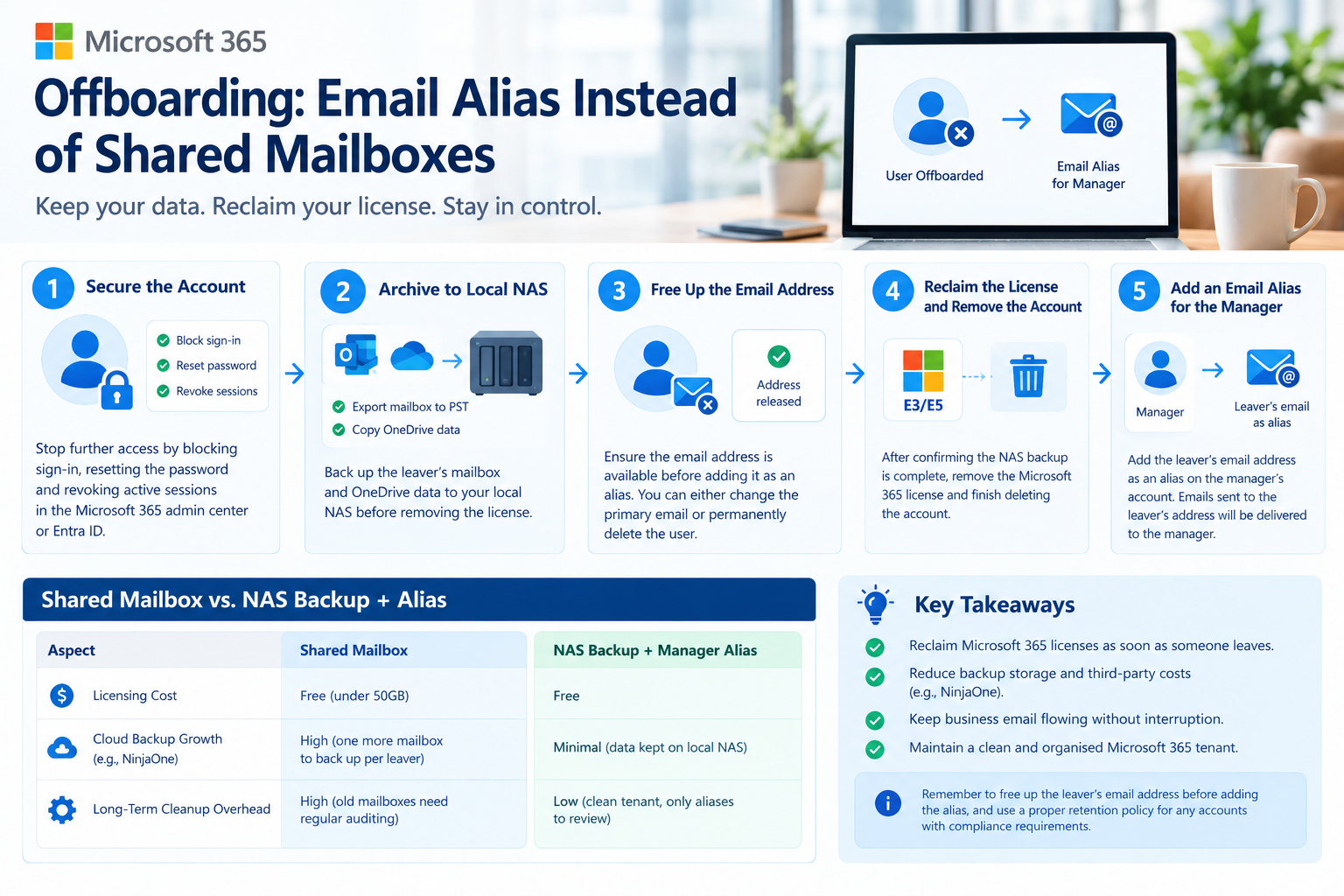
Employee offboarding is more than disabling an account. IT needs to secure access, preserve company data, recover Microsoft 365 licences and ensure important emails continue reaching the right people.
A common approach is to convert a departing employee’s mailbox into a shared mailbox. This keeps the mailbox accessible to authorised staff, but retaining every former employee’s mailbox can create additional administration and increase the volume of data being managed.
In our environment, we use a different approach for suitable departures. We back up Microsoft 365 daily using NinjaOne, retain former employees’ data in the cloud for seven years, and keep a separate copy on our local NAS. When the business only needs new emails to reach the former employee’s manager, we can use an email alias instead of keeping a shared mailbox for that purpose.
This approach helps us reclaim licences while maintaining our existing backup and retention arrangements. The key is to understand that backup, long-term retention and email routing are three separate requirements.
1. Why We Use an Alternative to Shared Mailboxes
Shared mailboxes are useful when a manager needs access to historical conversations, when a team needs to manage an ongoing mailbox, or when someone needs to send emails using the former employee’s address.
However, not every departure requires a permanently accessible mailbox.
Backup and administration
We use NinjaOne to back up our Microsoft 365 environment daily, including Outlook email, OneDrive, SharePoint and Teams. Our backup setup also covers shared mailboxes.
Keeping old mailboxes can increase the amount of data that needs to be protected. Depending on the backup provider’s licensing and storage model, it may also affect storage consumption or subscription costs. The actual impact depends on the provider’s terms, so an additional shared mailbox does not necessarily mean an additional charge.
There is also a long-term administration issue. After several years, it can become difficult to identify who owns an old shared mailbox, why it was retained and whether the business still needs it.
Our aim is not to eliminate shared mailboxes entirely. It is to avoid retaining them when there is no ongoing need for mailbox access or functionality.
2. Our Offboarding Process
Step 1: Secure the account
First, prevent the departing employee from accessing company resources.
- Block sign-in to the account.
- Revoke active sessions and refresh tokens.
- Reset credentials where appropriate.
- Remove access to other systems, including VPNs and third-party applications.
- Recover company devices and review any remaining access.
Blocking sign-in is an important first step, but it does not automatically remove every permission or session in connected applications.
Step 2: Confirm NinjaOne backups and seven-year cloud retention
Before removing a licence or making changes to the account, we verify that the required data is protected.
Our existing process includes daily NinjaOne backups of Outlook, OneDrive, SharePoint and Teams, including shared mailboxes. Separately, our organisation retains former employees’ Microsoft 365 data in the cloud for seven years. We also keep a copy of the required data on our local NAS.
These controls serve different purposes:
- NinjaOne: Provides backup and recovery capabilities for the configured Microsoft 365 workloads.
- Cloud retention: Preserves data according to the organisation’s seven-year retention requirements.
- Local NAS: Provides a separate copy of the required data outside the active Microsoft 365 environment.
Before proceeding, confirm that the latest backups completed successfully, the required data is covered by the retention arrangement, and the retention will continue to work after the planned licence and account changes.
A backup is not a substitute for a retention policy, and a retention policy should not be assumed to protect every service or feature after a licence is removed.
Step 3: Archive the required data to the NAS
In addition to our cloud-based protection, we keep a local archive of the required departing employee data.
Depending on the business requirements, this may include:
- An Outlook mailbox export in PST format.
- A copy of the employee’s OneDrive files.
- Other required business records.
After copying the data, verify that the archive contains the expected files and that authorised staff can access it.
A NAS archive is useful as a separate copy, but it should also be protected with appropriate access controls, security measures and a recovery plan. It does not replace our daily NinjaOne backups or the seven-year cloud retention requirement.
Step 4: Release the former employee’s email address
Before adding the former employee’s address to a manager’s account, make sure it is no longer assigned to the original mailbox or another recipient object.
For example, if the former employee used leaver@company.com, that address must be available before it can be assigned as an alias to manager@company.com.
The process depends on how the account is managed. For a cloud-only account, the address may need to be changed or removed from the original recipient. For an account synchronised from on-premises Active Directory, changes may need to be made at the authoritative source and synchronised to Microsoft 365.
Deleting a user does not necessarily release an email address immediately. Deleted accounts may remain recoverable, and the address may still be associated with a recipient object.
Important: Do not permanently delete an account or remove its licence just to free the email address. First confirm how the seven-year cloud retention requirement will be maintained. Where applicable, the mailbox may need to be preserved using Microsoft’s supported retention or inactive-mailbox process.
Step 5: Reclaim the licence safely
Once the backups and NAS archive have been verified, and the cloud retention requirements have been checked, we can reclaim the Microsoft 365 licence when it is appropriate to do so.
This makes the licence available for another employee instead of leaving it assigned to an account that no longer needs it.
However, removing a licence can affect mailbox and other Microsoft 365 services. The exact outcome depends on the service, licence and retention configuration.
For example, retaining Exchange mailbox data as an inactive mailbox requires the mailbox to meet Microsoft’s applicable conditions. A seven-year retention requirement alone should not be assumed to preserve every service or feature after licence removal.
The important point is to verify that the required data will remain preserved for the full retention period before completing the licence and account changes.
Step 6: Route new emails using an alias
Once the former employee’s email address has been released, we can add it as an alias to the manager’s account if the business only needs future incoming emails to reach that person.
For example:
- Former employee:
leaver@company.com - Manager:
manager@company.com - Alias on the manager’s account:
leaver@company.com
Emails sent to the former employee’s address can then arrive in the manager’s mailbox because the address is associated with that account.
An alias is simple to manage, but it has limitations:
- Replies use the manager’s address by default. An alias does not automatically let the manager send as the former employee.
- Historical emails are not available through the alias. The alias does not provide access to the former employee’s old mailbox or folders.
- There is no separate automatic reply. An alias does not have its own mailbox settings for an out-of-office message.
- Messages become accessible to the manager. Confirm that this is appropriate for the business and its privacy requirements.
- Aliases need periodic reviews. Record why each alias is retained and remove it when it is no longer required.
Our seven-year cloud retention and backup arrangements preserve historical data separately. The alias has a different purpose: routing new emails to the person responsible for the handover.
3. Shared Mailbox vs Our Offboarding Approach
| Consideration | Shared Mailbox | Cloud Retention + NAS + Alias |
|---|---|---|
| Historical email access | Available through the mailbox to authorised users | Preserved separately; access depends on the configured retention and recovery method |
| New incoming emails | Managed through the shared mailbox | Delivered to the manager through the alias |
| Reply using former employee’s address | Possible with appropriate permissions | Not provided by the alias alone |
| NinjaOne backup | Shared mailboxes are included in our backup setup | Daily backups continue according to the configured scope and account lifecycle |
| Seven-year cloud retention | Must be configured and maintained as required | Maintained separately from the NAS archive and alias |
| Local NAS copy | Optional | Maintained as an additional archive in our process |
| Licence recovery | A shared mailbox may not require its own licence within applicable limits; some features require licensing | The former employee’s licence can be reclaimed when the retention and account requirements permit |
| Ongoing administration | Requires mailbox ownership and periodic reviews | Requires retention monitoring, NAS archive management and alias reviews |
A shared mailbox remains the better choice when the business needs ongoing mailbox access or functionality. Our alternative separates historical data preservation from the routing of new messages, allowing us to select the most appropriate approach for each departure.
Conclusion
Our Microsoft 365 offboarding process combines daily NinjaOne backups, seven-year cloud retention, a local NAS archive and email aliases for suitable handovers.
This allows us to preserve business data and reclaim licences when appropriate without automatically keeping every former employee’s mailbox as a shared mailbox.
The most important lesson is to verify backups and retention before changing licences or deleting accounts. An email alias is useful for routing new messages, but it does not replace historical mailbox access, backup or long-term retention.
Leave a Reply