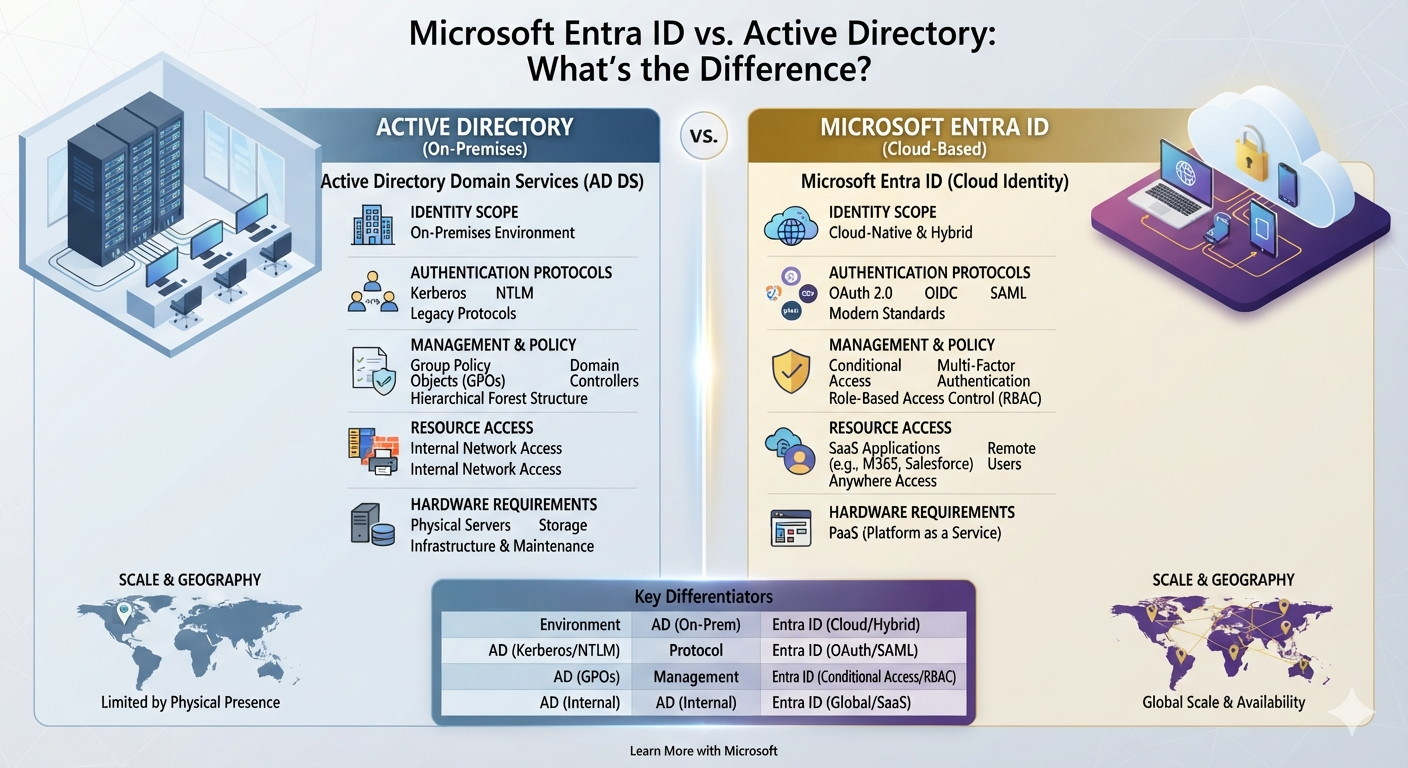
If you’ve worked with Microsoft 365, Windows devices, or corporate IT infrastructure, you’ve probably heard the terms Active Directory (AD), Azure AD, and Microsoft Entra ID.
For many non-technical stakeholders—and even IT administrators moving from traditional infrastructure to modern cloud environments—these terms can be confusing.
- Are Active Directory and Microsoft Entra ID the same thing?
- Do companies still need on-premises Active Directory?
- What is Microsoft Entra Connect?
- Where does Microsoft Intune fit into all of this?
- Should companies eventually move their Windows devices to Microsoft Entra Join?
After years of managing a hybrid IT environment, I’ve found that understanding the difference between these technologies is becoming increasingly important.
In this article, I’ll explain the differences between Active Directory and Microsoft Entra ID and share some practical lessons from managing a real-world hybrid Microsoft environment.
1. What Is Active Directory (AD DS)?
Active Directory Domain Services (AD DS) is Microsoft’s traditional on-premises directory service. Microsoft introduced Active Directory with Windows 2000, and it has become a core component of many corporate Windows environments.
In a traditional environment, Active Directory is hosted on Windows Server Domain Controllers and provides centralized management of users, computers, groups, authentication, and security policies.
Some of the key capabilities include:
- User accounts and passwords
- Security groups
- Computer accounts
- Organizational Units (OUs)
- Group Policy Objects (GPOs)
- Kerberos and NTLM authentication
- LDAP directory services
- Domain joining for Windows computers
Active Directory also commonly works closely with other on-premises infrastructure services such as DNS, file servers, VPN solutions, and network authentication systems.
My Experience With Active Directory
In my environment, our business has been running on traditional IT infrastructure for more than 20 years.
Over that time, Active Directory naturally became a core part of the environment.
It has been used for everything from user authentication and computer management to Group Policy and access control for internal resources.
Our current environment includes Windows Server 2022, with Active Directory Domain Services running alongside other infrastructure services.
This is one of the reasons that moving completely to the cloud isn’t simply a matter of switching off a server.
There are years of existing systems, policies, applications, and user workflows that need to be considered.
2. What Is Microsoft Entra ID (Formerly Azure AD)?
Microsoft Entra ID is Microsoft’s cloud-based identity and access management service. It was previously called Azure Active Directory (Azure AD) before Microsoft changed the name to Microsoft Entra ID in 2023.
However, Entra ID is not simply “Active Directory hosted in the cloud.”
The two platforms were designed for different purposes.
Active Directory was designed around traditional Windows domain environments, while Entra ID is designed primarily for cloud identity, modern authentication, SaaS applications, and access to resources such as Microsoft 365.
Some of the key capabilities of Entra ID include:
- Microsoft 365 authentication
- Multi-Factor Authentication (MFA)
- Conditional Access
- Single Sign-On (SSO)
- Cloud application access
- External identities and guest access
- Passwordless authentication
- Device identity and integration with Microsoft Intune
For example, when an employee signs into Outlook, Microsoft Teams, SharePoint, or another SaaS application using their company account, Microsoft Entra ID can provide the identity and authentication layer behind that sign-in.
3. Active Directory vs. Microsoft Entra ID: Key Differences
The easiest way to understand the difference is to compare their primary roles.
| Feature | On-Premises Active Directory | Microsoft Entra ID |
|---|---|---|
| Primary location | On-premises Windows Servers | Microsoft Cloud |
| Main purpose | Windows domain and on-premises identity | Cloud identity and access |
| Domain Controllers | Required | Not required |
| Organizational Units (OUs) | Yes | No traditional OUs |
| Group Policy (GPO) | Yes | No traditional GPO |
| Authentication | Kerberos, NTLM, LDAP-based scenarios | Modern cloud authentication protocols |
| Windows devices | Domain Joined | Entra Joined / Hybrid Entra Joined |
| Microsoft 365 | Not the native cloud identity platform | Core identity platform |
| MFA | Not a native equivalent to Entra ID’s cloud MFA experience | Native MFA capabilities |
| Conditional Access | Not a traditional AD DS feature | Yes |
| Device management | GPO and other management tools | Commonly integrated with Intune |
Microsoft describes Entra ID as a cloud identity and access service, while Active Directory Domain Services provides traditional directory, authentication, computer management, Group Policy, and related on-premises capabilities.
The important takeaway is:
Active Directory and Microsoft Entra ID are related, but they are not the same technology.
4. Why Do Many Companies Use Both? Hybrid Identity in Practice
In real-world IT environments, organizations don’t always have to choose between Active Directory and Microsoft Entra ID.
Many established environments use a hybrid identity model, where on-premises Active Directory and Microsoft Entra ID work together.
A typical setup might look like this:
On-Premises Active Directory
- Windows domain authentication
- Computer accounts
- Group Policy
- Legacy applications
- Internal file servers
- Existing domain-based workflows
Microsoft Entra ID
- Microsoft 365 authentication
- Cloud applications
- MFA
- Conditional Access
- Cloud identity
- Modern device identity
Microsoft provides Microsoft Entra Connect to synchronize identity information between on-premises Active Directory and Microsoft Entra ID. Microsoft Entra Connect Sync is specifically responsible for synchronizing identity data between the two environments.
How This Works in My Environment
Our environment currently uses Microsoft Entra Connect with Windows Server 2022.
When a new employee account is created in our local Active Directory, the relevant identity information is synchronized to Microsoft Entra ID.
This allows us to maintain a relationship between our traditional on-premises identity and our Microsoft 365 cloud identity.
For an organization that has been running Active Directory for many years, this hybrid model can be a practical way to adopt cloud services without immediately replacing the entire existing infrastructure.
5. Where Does Microsoft Intune Fit?
This is where things can become confusing because identity management and device management are related, but they aren’t the same thing.
A simple way to think about it is:
Microsoft Entra ID:
“Who is this user, and can they access this resource?”
Microsoft Intune:
“How should this device be configured and managed?”
Microsoft specifically integrates Intune with Entra ID so that device information can be used as part of access decisions. Windows devices can also be Entra joined and managed through Intune.
In our environment, we use both Group Policy and Intune.
Some legacy settings and traditional Windows configurations are still managed through GPO, while Intune is used for modern device management, application deployment, security policies, and other endpoint configurations.
I wrote more about this in my previous article:
[Microsoft Intune: How I Manage Company Laptops and Devices] https://aussiekim.com/microsoft-intune-device-management/
6. The Friction of Hybrid Join and the Case for Cloud-Native Devices
Hybrid identity provides a useful bridge between traditional infrastructure and the cloud, but it can also introduce additional operational complexity.
One area where I’ve experienced this firsthand is new laptop provisioning.
In our environment, setting up a new laptop under the traditional domain-based model can involve several manual steps.
For example:
- The laptop needs access to the corporate network to communicate with the on-premises Active Directory environment.
- IT needs to perform the initial domain-join and administrative configuration.
- Policies may need to be applied through both GPO and Intune.
- Additional configuration may be required before the device is ready for the end user.
This process works, but it isn’t always efficient.
It can also become more complicated when employees are working remotely and the device isn’t physically connected to the corporate network.
Moving Toward Microsoft Entra Joined Devices
This is one of the reasons we’re considering a more cloud-native approach for future devices.
Microsoft Entra joined devices can be managed with Microsoft Intune and are designed for modern cloud-based environments. Microsoft currently recommends Microsoft Entra Join for new cloud-native device deployments rather than deploying new devices as Microsoft Entra hybrid joined.
However, moving from Hybrid Join to Entra Join isn’t simply a technical switch.
Before making that transition, an organization needs to consider:
- Existing GPO dependencies
- Legacy applications
- File server access
- User profiles
- Authentication requirements
- Application deployment
- Device management policies
- IT support processes
For organizations with many years of existing infrastructure, this transition needs to be carefully planned.
7. Moving Beyond the Traditional File Server
Identity and device management are only part of the modernization process.
The same question applies to traditional file servers.
If employees are still relying heavily on mapped network drives and on-premises file servers, moving to a cloud-based document platform such as SharePoint Online can reduce some of the dependency on traditional infrastructure.
We’ve already started moving some of our company file-server data to SharePoint.
The process has involved more than simply copying files.
We’ve had to consider:
- Existing folder structures
- User permissions
- File paths
- User habits
- OneDrive synchronization
- Local storage
- Remote access
- Migration planning
I wrote about this migration in more detail here:
[SharePoint vs. Traditional File Servers: What I’ve Learned From Migrating Company Files] https://aussiekim.com/sharepoint-vs-traditional-file-servers/
For us, the goal isn’t simply to eliminate a server.
It’s to create an environment where users can access company information securely without being unnecessarily dependent on physical infrastructure or a traditional office network.
8. What I’ve Learned From Managing Hybrid Infrastructure
Managing a hybrid environment has taught me that cloud migration isn’t simply about replacing old technology with new technology.
There are several lessons I’ve learned along the way.
1. Identity Has Become Increasingly Important
Traditional network security often focused heavily on protecting the corporate network perimeter.
Modern cloud environments require much more focus on identity, authentication, device state, and access policies.
MFA is one important example.
Microsoft reports that using MFA can make an account more than 99.9% less likely to be compromised, based on Microsoft’s studies.
That doesn’t mean MFA eliminates every security risk, but it demonstrates why strong authentication has become such an important part of modern identity security.
2. Hybrid Infrastructure Can Be More Complicated Than It Looks
Running both on-premises and cloud systems gives an organization flexibility, but it also means IT teams have to understand how the different systems interact.
For example:
Active Directory
↓
Microsoft Entra Connect
↓
Microsoft Entra ID
↓
Microsoft 365 / Intune
A problem in one part of the chain can sometimes affect another.
Understanding these dependencies is therefore just as important as understanding each individual technology.
3. Cloud Migration Should Solve a Business Problem
Moving everything to the cloud simply because “cloud is better” isn’t necessarily a good strategy.
There are costs involved in cloud services, including licensing and storage.
However, when comparing those costs with the ongoing requirements of on-premises infrastructure—such as hardware refreshes, maintenance, backups, power, physical space, disaster recovery, and IT administration—the overall business case can be very different.
For our organization, the question isn’t simply:
“How much does SharePoint storage cost?”
It’s:
“What is the total cost and operational impact of continuing to maintain the old infrastructure?”
That is a much more useful question when planning an IT modernization project.
For broader context on how Microsoft 365 fits into our day-to-day IT environment, see [7 Things I’ve Learned Managing Microsoft 365 in a Real Business Environment]. https://aussiekim.com/microsoft-365-management-real-business/
Conclusion
Active Directory and Microsoft Entra ID are not competing technologies that an organization always has to choose between.
For many businesses, they can work together as part of a hybrid identity environment while the organization gradually modernizes its infrastructure.
From my experience as an IT Systems Manager, the most important part isn’t simply knowing what Active Directory, Entra ID, Intune, or Microsoft 365 does individually.
It’s understanding how these technologies work together and how they affect the people and business using them.
As organizations continue moving toward cloud-based identity, modern device management, and cloud collaboration platforms, IT professionals need to understand both the technology and the practical challenges involved in the transition.
For us, the long-term goal is to reduce unnecessary on-premises dependencies, simplify device provisioning, improve security, and give employees the flexibility to work securely from wherever they are.
The transition won’t happen overnight.
But understanding where the current environment is today—and where the organization ultimately wants to go—is the first step toward getting there.
Leave a Reply