Introduction
Email security in an enterprise environment is a balancing act. IT teams need to protect users from phishing and malicious links without creating unnecessary friction in everyday business processes.
In our environment, we route email through Mimecast as a secure email gateway, using the appropriate mail-flow configuration and DNS MX records. We also use URL protection to help defend users against potentially malicious links in incoming emails.
However, security controls can sometimes affect legitimate workflows. One practical example we encountered was timesheet approval: managers receiving multiple notification emails could repeatedly encounter URL security checks when opening approval links.
The challenge was to reduce unnecessary interruptions without creating a broad security exception that could expose users to phishing attacks.
In this article, I explain our Mimecast email-routing approach, how URL protection helps assess links, and the considerations IT administrators should address when configuring narrowly scoped URL exemptions.
1. How Email Flows Through Mimecast and Microsoft 365
A secure email gateway can sit between the internet and Microsoft 365 to inspect email before it reaches users. In our environment, Mimecast is part of this mail-flow architecture.
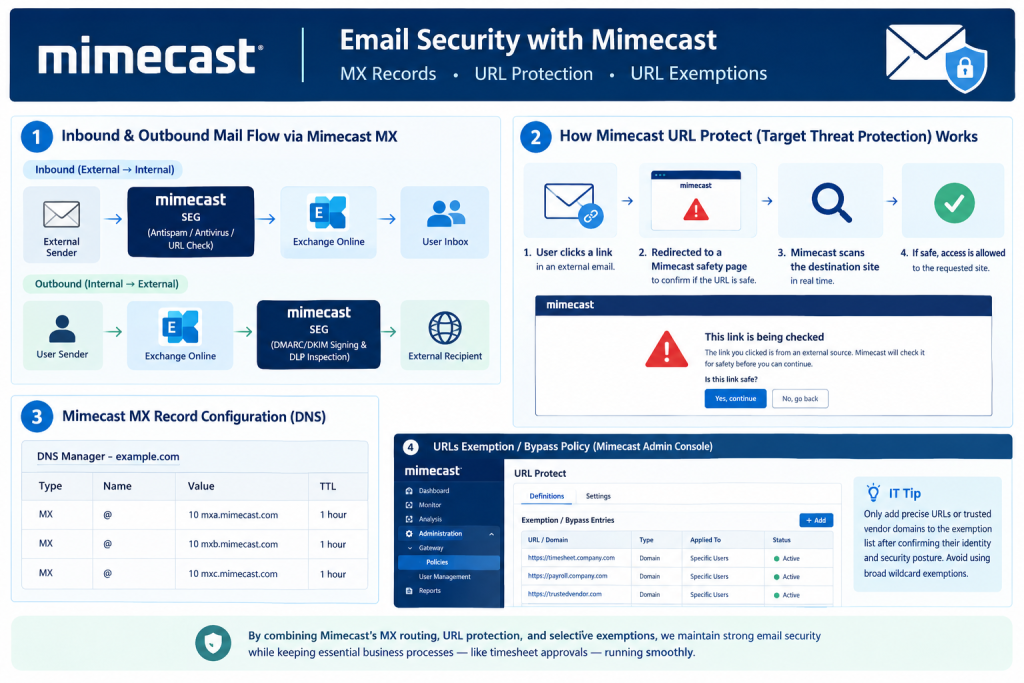
Inbound email flow
Our intended inbound flow is:
External sender → Mimecast → Exchange Online → User mailbox
When an external email arrives, Mimecast applies the configured security checks, which may include spam and malware filtering, URL protection, and other email security policies. Messages that pass the applicable checks can then be delivered to Exchange Online.
The exact handling of a message depends on the policies and configuration in place.
Outbound email flow
Our outbound routing is designed to send messages through the configured Mimecast service before delivery to external recipients:
User mailbox → Exchange Online → Mimecast → External recipient
This typically requires the appropriate outbound connector and Mimecast configuration, along with the relevant DNS and authentication settings.
Depending on the environment, outbound controls may include spam or malware inspection, data-loss prevention, and email authentication. DKIM signing, in particular, must be configured and validated for the actual mail flow; it should not be assumed that Mimecast automatically performs all DKIM or DMARC-related functions.
Why the configuration matters
Using a secure email gateway adds an important inspection layer, but it does not automatically guarantee that every malicious message will be blocked or that Microsoft 365 can never receive mail through another route.
IT administrators should also review the Microsoft 365 inbound connector configuration, accepted domains, anti-spoofing controls, and other relevant protections to reduce the risk of messages bypassing the intended gateway.
For background on Microsoft 365 connectors, see Microsoft Learn: Configure mail flow using connectors.
2. How Mimecast URL Protection Helps Protect Users
Phishing emails often contain links that look legitimate but lead to credential-harvesting pages, malicious downloads, or compromised websites.
Mimecast URL protection, including functionality associated with Targeted Threat Protection, can help assess links and protect users when they click them.
Depending on the policy and configuration, the protection process may include rewriting a URL in an email and checking its destination when a user clicks it. If the destination is considered suspicious or cannot be accessed under the applicable policy, the user may see a warning or be blocked.
A simplified process looks like this:
- A user receives an email containing a link.
- The link is processed according to the configured URL protection policy.
- When the user clicks it, the destination is checked under the applicable protection rules.
- The user is allowed to continue, shown a warning, or blocked, depending on the result and policy.
The precise user experience varies. Not every protected link produces a warning page, and a warning does not necessarily mean the link is malicious.
Why this extra layer matters
A link that was safe when an email was first delivered may become dangerous later if a website is compromised or its content changes. Time-of-click checks can help address this type of threat.
URL protection is still only one layer of defence. It should complement anti-phishing policies, email authentication, endpoint protection, multifactor authentication, and user security awareness.
3. A Real-World Challenge: Timesheet Approval Links
One operational issue we encountered involved weekly timesheet approvals.
Managers received multiple notification emails containing links to review or approve timesheets. Depending on the URL protection policy and the destination, repeatedly opening these links could introduce additional security checks into an otherwise routine process.
For managers handling many approvals, even a small interruption can become frustrating when repeated throughout the week.
Simply disabling URL protection for everyone was not an acceptable solution. It would have reduced protection far beyond the specific workflow causing the problem.
Instead, the objective was to identify the legitimate business application and determine whether a narrowly scoped exception could reduce unnecessary friction without weakening protection for unrelated links.
What IT should verify first
Before creating an exemption, check:
- Whether the affected link is genuinely generated by the approved timesheet or payroll platform.
- Whether the destination uses a stable, documented domain controlled by the legitimate service provider.
- Whether the behaviour is caused by the current URL protection policy or by another security control.
- Whether the vendor has changed its domains, redirect behaviour, or authentication process.
- Whether the business owner and security team approve the proposed exception.
Do not rely only on the sender’s display name or the appearance of a familiar URL. Phishing messages can imitate legitimate notification emails.
4. Configuring URL Protection Exemptions Safely
Mimecast administration interfaces and policy options can change, and the exact steps depend on the products and configuration enabled in your tenant. Use the current Mimecast documentation and your organisation’s configuration when locating the relevant URL protection policy or exemption controls.
A safe implementation process should focus on scope and validation rather than simply adding a broad domain to an allow list.
Step 1: Identify the exact destination
Start with the URL users are clicking and confirm the legitimate destination with the application owner or vendor.
Where possible, determine whether the service uses a dedicated, stable hostname. Avoid assuming that every subdomain or redirect associated with a vendor is equally trustworthy.
Step 2: Review the available policy controls
In the Mimecast Administration Console, review the URL protection or Targeted Threat Protection policies relevant to the affected users and messages.
Confirm which policy is matching the URL and what exemption options are supported by your current configuration. Menu labels and policy structures may differ between product versions and configurations.
Step 3: Scope the exception as narrowly as possible
If an exemption is justified, limit it to the minimum scope supported by the platform and required by the business case.
Consider:
- The specific trusted destination or documented hostname.
- The users or group that genuinely need the exception.
- Whether the exemption affects URL rewriting, time-of-click checks, or another protection behaviour.
- Whether the exception can be limited to the relevant workflow without affecting other links.
Avoid broad wildcard exemptions or disabling URL protection for an entire organisation just to resolve one application issue. If the platform cannot support a sufficiently narrow exception, consider whether the workflow or application can be adjusted instead.
Step 4: Test before broad deployment
Test the change with a small group of affected users first.
Verify that legitimate timesheet links work as expected and that unrelated external links remain subject to the intended security controls. Review logs or available reporting to confirm the policy behaves as expected.
Document the reason for the exception, its owner, approval, scope, and review date.
Step 5: Review the exception regularly
Vendor domains, application ownership, and business processes can change. A URL that was legitimate when the exception was created may no longer be appropriate later.
Include URL exemptions in regular security-policy reviews and remove them when the business requirement ends.
5. Practical Checklist for IT Administrators
Before making changes to URL protection, use this checklist:
| Review area | Action |
|---|---|
| Email routing | Confirm the intended inbound and outbound mail flows through Mimecast. |
| URL behaviour | Identify the exact policy and behaviour affecting users. |
| Destination validation | Verify the URL with the application owner or trusted vendor documentation. |
| Exception scope | Restrict the exemption to the narrowest practical scope. |
| Testing | Test the legitimate workflow and unrelated links. |
| Documentation | Record the reason, approval, owner, and scope of the exception. |
| Ongoing review | Reassess the exception periodically and remove it when no longer required. |
The goal is not to remove security controls whenever they inconvenience users. It is to understand the business problem and make a controlled change that preserves the organisation’s overall security posture.
Conclusion
Mimecast is an important component of our email-security architecture, helping inspect email traffic and protect users from threats such as malicious links.
Our timesheet approval experience highlighted a familiar challenge for IT teams: a security control can be effective and still create friction in a legitimate business workflow.
The right response is not to disable protection globally. It is to investigate the behaviour, validate the application, assess the available policy controls, and make a narrowly scoped change only when justified.
For IT systems managers, the broader lesson is that email security requires ongoing policy review. Strong protection and productive workflows can coexist when exceptions are carefully assessed, documented, tested, and reviewed.
Leave a Reply